
You are getting an email about the order placed and you will see the order under the orders section on Vendor Dashboard. To give feedback about order processing and expected delivery time, open the order details and click “Create New Shipment” to start the delivery arrangement. You don’t need to wait till physically shipping the package but you can create the shipment straight after closing the deal and then by setting the order Status accordingly.
Pay attention to the delivery type selected by the customer – either Shopnest integrated partner (Kwik) or a separate delivery agreement. In the last case, the delivery fees have not been charged and Shopnest is not tracking the delivery process.
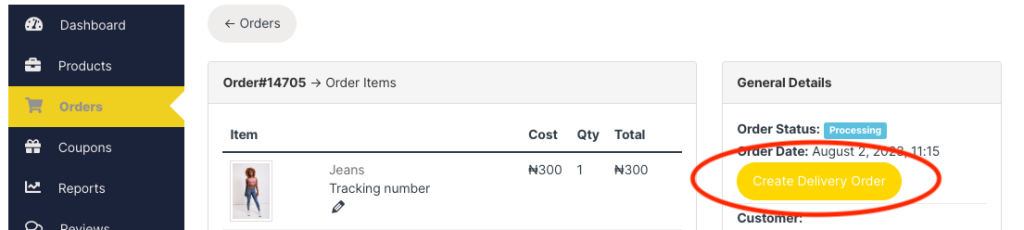
If the customer has selected our integrated partner’s delivery (Kwik), then click the button “Create delivery”- system automatically links up with Kwik and places the order for delivery.
The pickup point sent to Kwik is your store address and the drop-off point is the address that the customer has inserted.
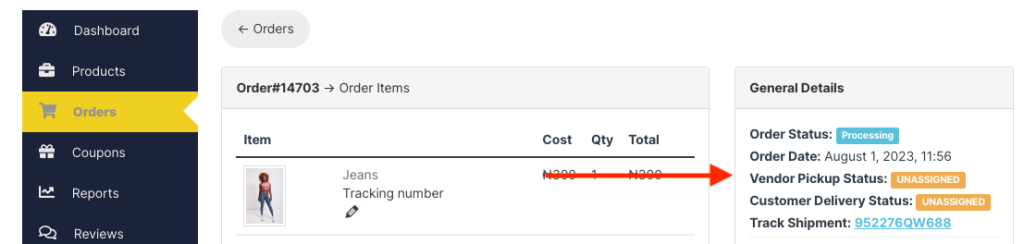
Once the order is delivered to the customer, don’t forget to update the order status to “Completed.” Be accurate on your delivery times for building high ratings and trust for the customers.